The Index-as-Key Antipattern in React
 Image: pixabay.com
In this article I will explain why the key prop matters in React and how misusing it can cause problems while building our applications.
We know that manipulating DOM elements is expensive. React uses several techniques to handle this process efficiently, but there are times when, as developers, we need to help optimize it.
The help we can give React lies in the key prop, which it uses to match elements that have already been loaded in the DOM and later compare them to decide whether they need to be rendered again.
Next, we will see that with an incorrect value assigned to the key prop, our component may not behave the way we expect.
The following example uses React version 16.8.0, which introduces new features, including Hooks. If you are not yet familiar with this way of working, I invite you to read more in the Hooks documentation.
The problem
We have a list of products represented by the constant data.
const data = [
  { id: 43434, name: 'Tangerine' },
  { id: 86756, name: 'Granadilla' }
];
Then we implement the App component, which holds a product state initialized with the value of data to render the product list.
const App = () => {
  const [products, setProducts] = useState(data);

  const updateProducts = () => {
    const newProducts = [...products];

    newProducts.unshift({
      id: 65878,
      name: 'Strawberry'
    });
    setProducts(newProducts);
  };

  return (
    <>
      <ul>
        {products.map((product, index) => (
          <li key={index}>
            <span>{product.name}: </span>
            <input type="text" />
          </li>
        ))}
      </ul>
      <button onClick={updateProducts}>Add</button>
    </>
  );
};
As we can see, the component also has an event handler that lets us add one more product at the top of the list. Let’s see how it looks on screen…
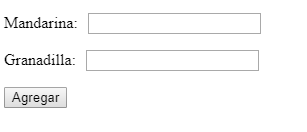
Now, let’s assign a quantity to each product.
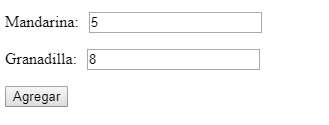
Once that’s done, we will add another product by clicking the “Add” button and see what happens.
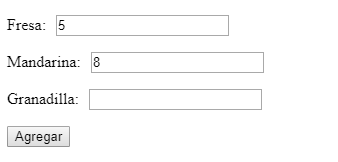
We can see that something is wrong. 😱
The products have been given incorrect quantities, and those values persisted according to the position they had in the array.
Let’s look at the rendering flow…
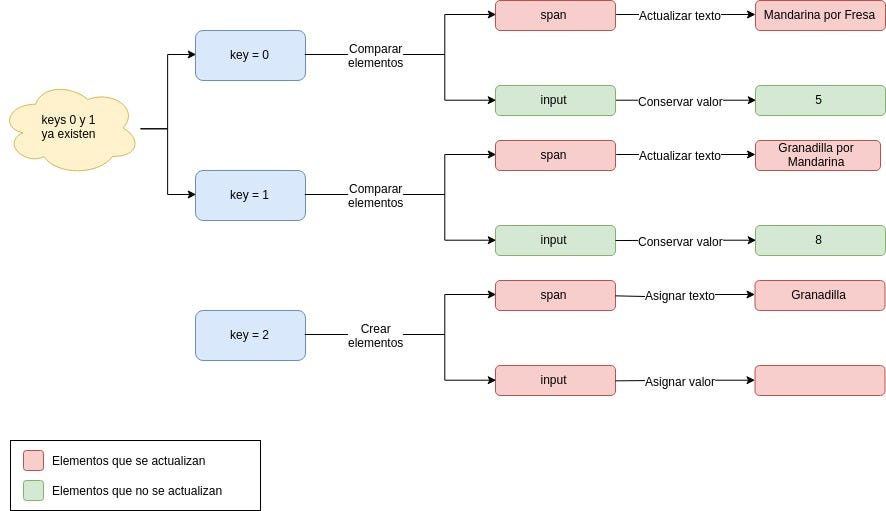
In the previous diagram we can see that React is performing several DOM updates, when all it should do is insert the necessary elements at the top.
This happens because in our component’s implementation, the key prop has the value of index, which represents the element’s position in each iteration. So, when the state changes, React processes the component and compares the DOM with the Virtual DOM. Since there is an element with the key of the initial position (position 0), it only updates what doesn’t match, in this case only the product name and not the text box. The same happens with the second element (position 1), while for the third one, since no key with that value exists (position 2), React inserts a new element at the bottom of the product list.
The solution
To fix this, the good practice is to assign the key prop a unique, non-repeating value for each element. In this case we could use the id property.
const App = () => {
  const [products, setProducts] = useState(data);

  const updateProducts = () => {
    const newProducts = [...products];

    newProducts.unshift({
      id: 65878,
      name: 'Strawberry'
    });
    setProducts(newProducts);
  };

  return (
    <>
      <ul>
        {products.map((product, index) => (
          <li key={product.id}>
            <span>{product.name}: </span>
            <input type="text" />
          </li>
        ))}
      </ul>
      <button onClick={updateProducts}>Add</button>
    </>
  );
};
Now we enter the quantities for each product and then click the “Add” button.
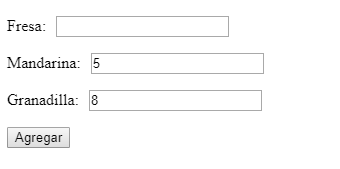
Let’s see how React’s rendering process went…
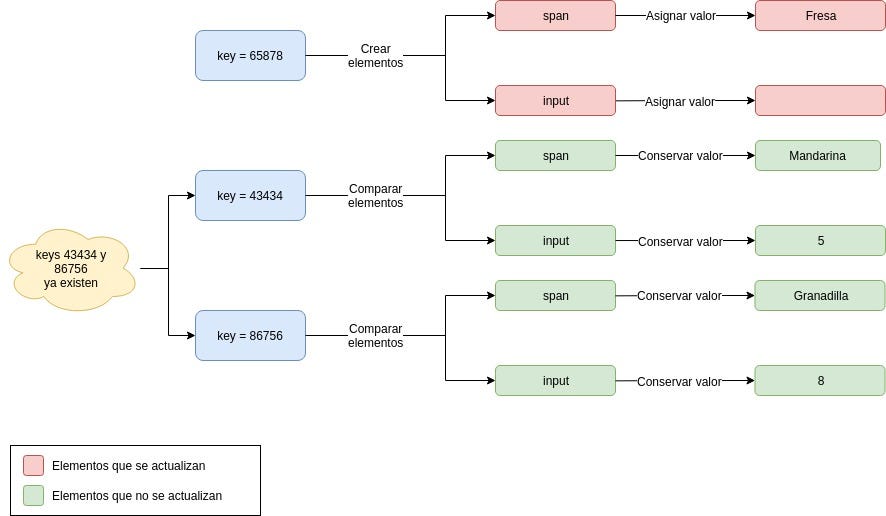
As we can see, the component now shows no change in its behavior and performs no additional DOM updates, optimizing our component’s rendering process. 😁
Conclusions
As we have seen, we must always keep in mind that the key prop is very important to React, and we must be careful when assigning its value. Remember that this value must be unique and non-repeating among sibling elements. If we achieve this, we can get the most out of the library in terms of performance.
Thank you for your time, and I hope this article was helpful.
You can follow me on Twitter as @jcontrerasm_dev or on GitHub as @jcontrerasm.